2.2 Tokenizing text
Let’s discuss how we split input text into individual tokens, a required preprocessing step for creating embeddings for an LLM. These tokens are either individual words or special characters, including punctuation characters, as shown in figure 2.4.
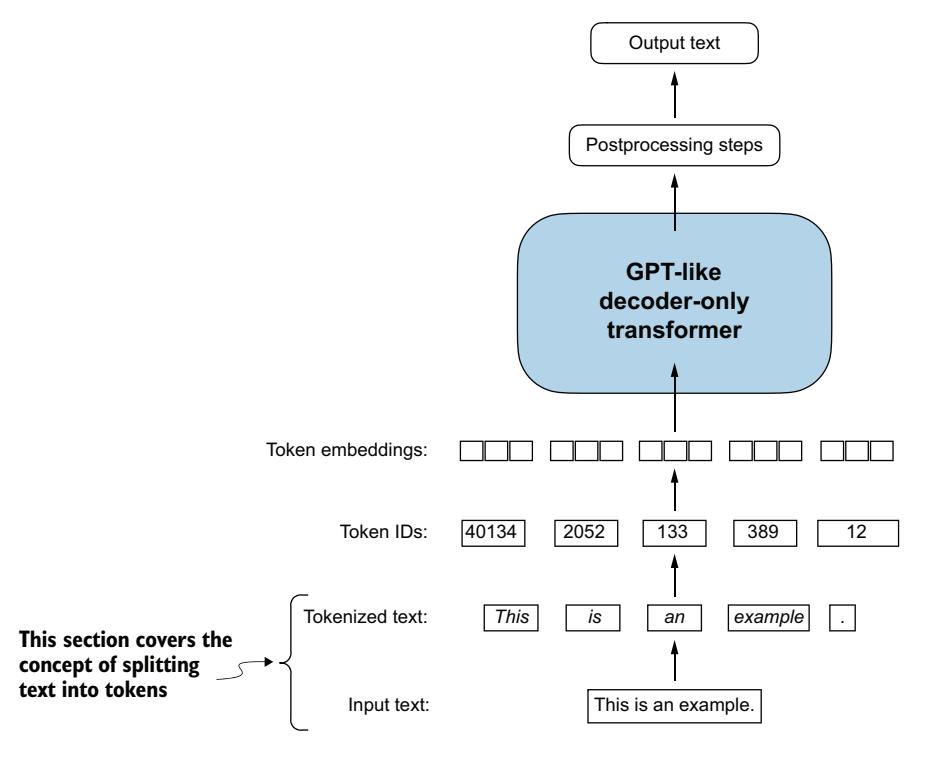
Figure 2.4 A view of the text processing steps in the context of an LLM. Here, we split an input text into individual tokens, which are either words or special characters, such as punctuation characters.
The text we will tokenize for LLM training is “The Verdict,” a short story by Edith Wharton, which has been released into the public domain and is thus permitted to be used for LLM training tasks. The text is available on Wikisource at https://en.wikisource.org/wiki/The_Verdict, and you can copy and paste it into a text file, which I copied into a text file “the-verdict.txt”.
Alternatively, you can find this “the-verdict.txt” file in this book’s GitHub repository at https://mng.bz/Adng. You can download the file with the following Python code:
import urllib.request
url = ("https://raw.githubusercontent.com/rasbt/"
 "LLMs-from-scratch/main/ch02/01_main-chapter-code/"
 "the-verdict.txt")
file_path = "the-verdict.txt"
urllib.request.urlretrieve(url, file_path)
Next, we can load the the-verdict.txt file using Python’s standard file reading utilities.
Listing 2.1 Reading in a short story as text sample into Python
with open("the-verdict.txt", "r", encoding="utf-8") as f:
 raw_text = f.read()
print("Total number of character:", len(raw_text))
print(raw_text[:99])
The print command prints the total number of characters followed by the first 99 characters of this file for illustration purposes:
Total number of character: 20479
I HAD always thought Jack Gisburn rather a cheap genius--though a good fellow
     enough--so it was no
Our goal is to tokenize this 20,479-character short story into individual words and special characters that we can then turn into embeddings for LLM training.
NOTE It’s common to process millions of articles and hundreds of thousands of books—many gigabytes of text—when working with LLMs. However, for educational purposes, it’s sufficient to work with smaller text samples like a single book to illustrate the main ideas behind the text processing steps and to make it possible to run it in a reasonable time on consumer hardware.
How can we best split this text to obtain a list of tokens? For this, we go on a small excursion and use Python’s regular expression library re for illustration purposes. (You don’t have to learn or memorize any regular expression syntax since we will later transition to a prebuilt tokenizer.)
Using some simple example text, we can use the re.split command with the following syntax to split a text on whitespace characters:
import re
text = "Hello, world. This, is a test."
result = re.split(r'(s)', text)
print(result)
The result is a list of individual words, whitespaces, and punctuation characters:
['Hello,', ' ', 'world.', ' ', 'This,', ' ', 'is', ' ', 'a', ' ', 'test.']
This simple tokenization scheme mostly works for separating the example text into individual words; however, some words are still connected to punctuation characters that we want to have as separate list entries. We also refrain from making all text lowercase because capitalization helps LLMs distinguish between proper nouns and common nouns, understand sentence structure, and learn to generate text with proper capitalization.
Let’s modify the regular expression splits on whitespaces (s), commas, and periods ([,.]):
result = re.split(r'([,.]|s)', text)
print(result)
We can see that the words and punctuation characters are now separate list entries just as we wanted:
['Hello', ',', '', ' ', 'world', '.', '', ' ', 'This', ',', '', ' ', 'is',
' ', 'a', ' ', 'test', '.', '']
A small remaining problem is that the list still includes whitespace characters. Optionally, we can remove these redundant characters safely as follows:
result = [item for item in result if item.strip()]
print(result)
The resulting whitespace-free output looks like as follows:
['Hello', ',', 'world', '.', 'This', ',', 'is', 'a', 'test', '.']
NOTE When developing a simple tokenizer, whether we should encode whitespaces as separate characters or just remove them depends on our application and its requirements. Removing whitespaces reduces the memory and computing requirements. However, keeping whitespaces can be useful if we train models that are sensitive to the exact structure of the text (for example, Python code, which is sensitive to indentation and spacing). Here, we remove whitespaces for simplicity and brevity of the tokenized outputs. Later, we will switch to a tokenization scheme that includes whitespaces.
The tokenization scheme we devised here works well on the simple sample text. Let’s modify it a bit further so that it can also handle other types of punctuation, such as question marks, quotation marks, and the double-dashes we have seen earlier in the first 100 characters of Edith Wharton’s short story, along with additional special characters:
text = "Hello, world. Is this-- a test?"
result = re.split(r'([,.:;?_!"()']|--|s)', text)
result = [item.strip() for item in result if item.strip()]
print(result)
The resulting output is:
['Hello', ',', 'world', '.', 'Is', 'this', '--', 'a', 'test', '?']
As we can see based on the results summarized in figure 2.5, our tokenization scheme can now handle the various special characters in the text successfully.
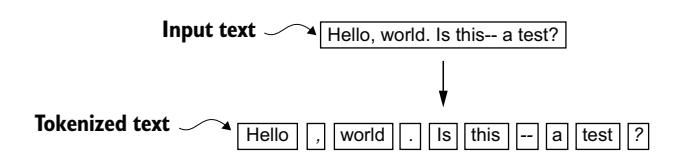
Figure 2.5 The tokenization scheme we implemented so far splits text into individual words and punctuation characters. In this specific example, the sample text gets split into 10 individual tokens.
Now that we have a basic tokenizer working, let’s apply it to Edith Wharton’s entire short story:
preprocessed = re.split(r'([,.:;?_!"()']|--|s)', raw_text)
preprocessed = [item.strip() for item in preprocessed if item.strip()]
print(len(preprocessed))
This print statement outputs 4690, which is the number of tokens in this text (without whitespaces). Let’s print the first 30 tokens for a quick visual check:
print(preprocessed[:30])
The resulting output shows that our tokenizer appears to be handling the text well since all words and special characters are neatly separated:
['I', 'HAD', 'always', 'thought', 'Jack', 'Gisburn', 'rather', 'a',
'cheap', 'genius', '--', 'though', 'a', 'good', 'fellow', 'enough',
'--', 'so', 'it', 'was', 'no', 'great', 'surprise', 'to', 'me', 'to',
'hear', 'that', ',', 'in']
2.3 Converting tokens into token IDs
Next, let’s convert these tokens from a Python string to an integer representation to produce the token IDs. This conversion is an intermediate step before converting the token IDs into embedding vectors.
To map the previously generated tokens into token IDs, we have to build a vocabulary first. This vocabulary defines how we map each unique word and special character to a unique integer, as shown in figure 2.6.
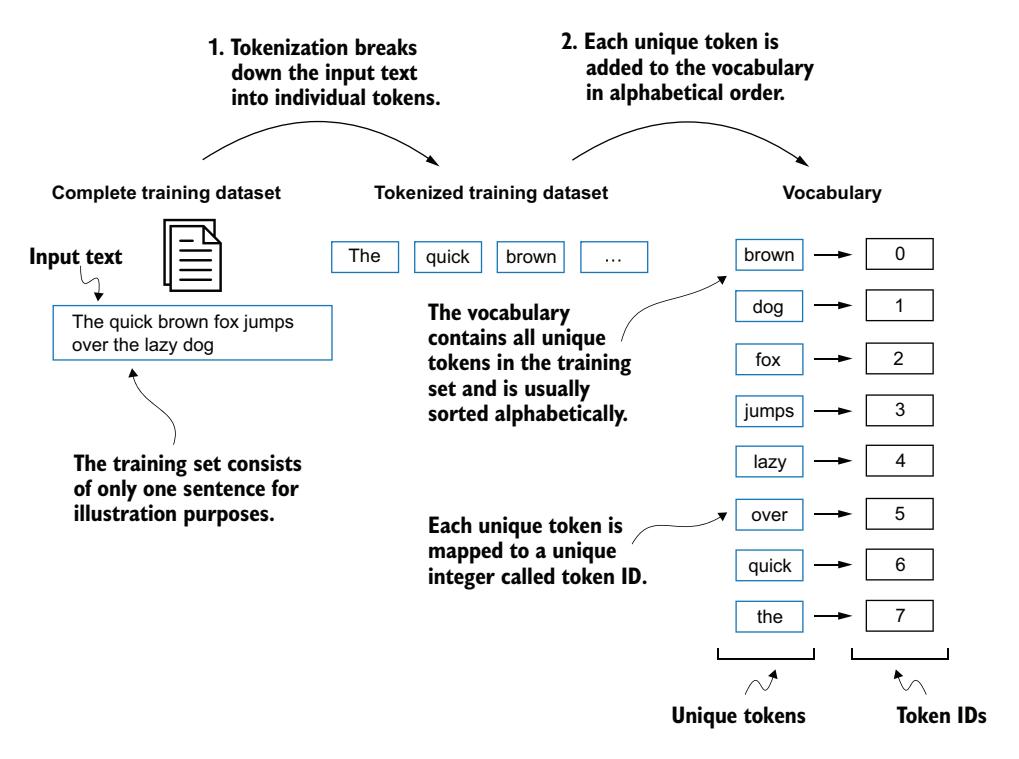
Figure 2.6 We build a vocabulary by tokenizing the entire text in a training dataset into individual tokens. These individual tokens are then sorted alphabetically, and duplicate tokens are removed. The unique tokens are then aggregated into a vocabulary that defines a mapping from each unique token to a unique integer value. The depicted vocabulary is purposely small and contains no punctuation or special characters for simplicity.
Now that we have tokenized Edith Wharton’s short story and assigned it to a Python variable called preprocessed, let’s create a list of all unique tokens and sort them alphabetically to determine the vocabulary size:
all_words = sorted(set(preprocessed))
vocab_size = len(all_words)
print(vocab_size)
After determining that the vocabulary size is 1,130 via this code, we create the vocabulary and print its first 51 entries for illustration purposes.
Listing 2.2 Creating a vocabulary
vocab = {token:integer for integer,token in enumerate(all_words)}
for i, item in enumerate(vocab.items()):
 print(item)
 if i >= 50:
 break